
What you need
- A Windows 10 or 11 PC.
- Anime Adventures.
- A lunaMacro key. During prerelease, keys are handed out in the Discord.
Activating your key
The first time you open lunaMacro, it asks for your license key. Paste it in and press activate. The key is saved, so you won't be asked again.
A key works on the PC it was first activated on, in any Windows account on it. If you move to a new PC, ask in the Discord.
The game window
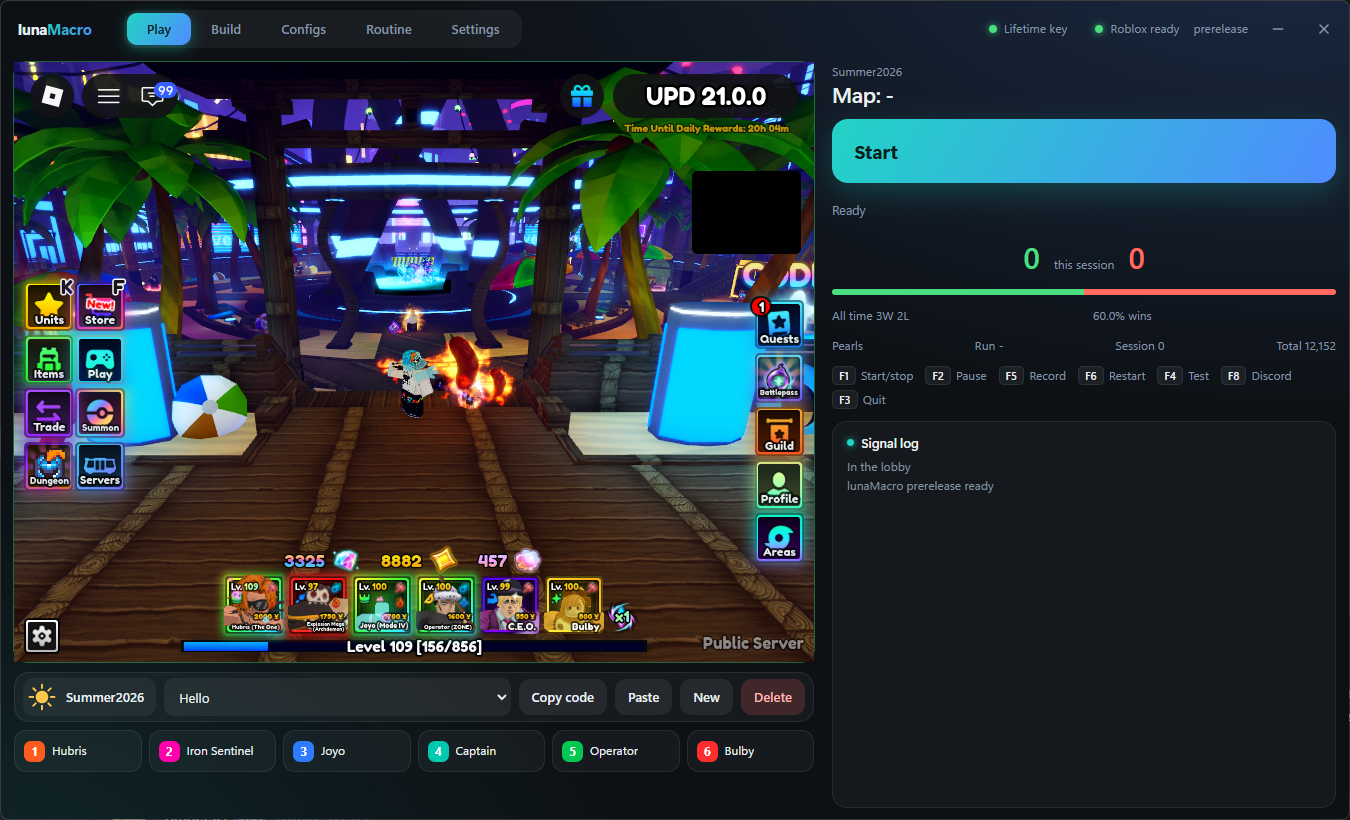
Open the game, either yourself or with the button on the Play page. lunaMacro finds the game window and docks it beside itself at the size it needs, so there's nothing to set up.
Don't cover the game window with other windows while a run is going. lunaMacro reads what's on screen, so it needs to see the game.
Picking a mode
Pick a mode when you open lunaMacro. You can change it later from the mode name at the top of the Play page.
| Mode | What it does |
|---|---|
| Summer2026 | Joins the Summer Event from the lobby, plays the match with the config for that map, and queues again. See The Summer Event. |
| Custom | Plays the stage you're already in, over and over with Replay. Good for any stage that isn't the event. |
The main pages
| Page | What's there |
|---|---|
| Play | Start and stop, the current map and step, your session score, pearls, and the signal log. |
| Build | The config you're working on: its placement steps, your team, and its run options. |
| Configs | Every config you have, grouped by mode, with packs and share codes. |
| Routine | A list of configs to play one after another. |
| Settings | Discord, reconnecting, placement timing, cards, the Summer Event, hotkeys and more. |
Your first run
- Open Build > Team and fill in your six units: each one's name, the hotbar key that places it, and whether it's a ground, hill or farm unit.
- Add your placements. The quickest way is to Record a match while you play it yourself; see Recording.
- For the event, stand where your units go in a match and press Save my spot in Run options. Each run walks back there before placing.
- Go back to Play and press Start, or F1.
Hotkeys
These work from any window. Change any of them in Settings > Controls.
| Key | Does |
|---|---|
| F1 | Start or stop the macro |
| F2 | Pause |
| F5 | Start or stop recording |
| F6 | Restart the run |
| F4 | Detection test |
| F8 | Send a test message to Discord |
| F3 | Quit lunaMacro |
Checking it can see the game
If something doesn't seem to be detected, run the detection test from Settings > Help or with F4: once while you're in a stage, and once on the end screen. The results show in the signal log, and they help a lot if you ask for help in the Discord.